Screenshots and validation
Browser captures were refreshed from RoomCall 0.23.0 on 2026-11-03. Native captures retain the compatible native 0.20.0 / build 4 client. Home Assistant captures include the Glass interface and receiver/TV interruption previews and restoration status. The captures illustrate real rendered interfaces with sample data; they do not demonstrate a particular household, physical speaker delivery or successful Apple signing. Room names, tasks, people and transcripts are examples.
Capture sources
| Images | Source | What is simulated |
|---|---|---|
ha-*.png, demo.gif |
Current card JavaScript rendered by Playwright Chromium in scripts/ha_card_harness.html |
HA state, users, devices, API results and microphone input |
screenshot-*.png |
Actual standalone server running --demo, captured by Playwright |
Speaker discovery and playback backends; microphone input |
ios-*.png |
Actual XCUITest screenshots from the tested 0.20.0 source run, framed by scripts/ios_mockups.py |
Debug-only demo service, rooms, tasks, history and connection results |
The native screen pixels come from the simulator; the surrounding phone frame is decorative. Screenshots show selected viewports and states, not every possible device, font size, theme or error. The browser harness supplies HA-like surrounding dashboard cards; those cards are not shipped as a RoomCall dashboard.
The capture manifest records the capture checkout's base commit, the iOS source commit/run, and SHA-256 hashes of all captures and their interface inputs (including capture-script edits on top of that base). CI checks that assets and recorded inputs still match. This detects drift; it cannot prove that all prose is correct, that someone heard a message, or that a visual issue is absent.
Refresh captures
Install the project's development/docs dependencies plus Playwright, ffmpeg and Chromium. From the repository root, capture all browser states:
python scripts/ha_screenshots.py
python scripts/qa_communication.py
python scripts/screenshots.py
For native captures, first require a successful iOS simulator test run for the
current native source. Download its roomcall-ios-simulator artifact, then frame
the exported attachments:
gh run download RUN_ID --name roomcall-ios-simulator --dir /tmp/roomcall-ios-captures
python scripts/ios_mockups.py /tmp/roomcall-ios-captures/ios-screenshots
Review every capture for incorrect states, clipping, personal data and misleading labels. Record the successful run ID and its source commit; the recorder refuses native input differences from that commit:
python scripts/doc_assets.py --record --ios-run RUN_ID --ios-commit SOURCE_COMMIT
python scripts/doc_assets.py
mkdocs build --strict
Commit the images and manifest together. Docs deployment publishes those reviewed assets rather than silently replacing screenshots during the build. If inputs change, regenerate/review the affected captures; refresh the complete set before recording again. Never update hashes just to suppress a stale-capture error.
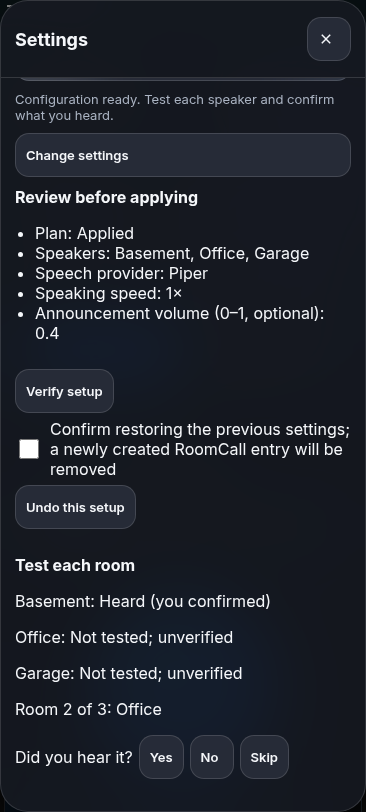
The guided setup also captures Test each room (assets/ha-room-listening.png).
It shows a simulated second-room listening question with Yes / No / Skip controls;
these buttons record the user’s answer, never an inferred playback result.
The device-discovery capture (assets/ha-device-discovery.png) shows a recently
available Cast TV and its Android TV Remote control. The audio checkbox remains
enabled for the recent Cast endpoint; the remote control is labelled and disabled
as an audio destination. Browser QA checks this state at 240, 390 and 600 pixels.
What remains a hardware check
CI covers browser communication/layout behavior, native unit/UI/screenshot tests, and Python statement coverage. It does not certify acoustic first-audio latency, physical microphone routing, every speaker's restoration behavior, camera two-way audio, background iOS delivery or App Store eligibility. Unknown audibility stays unknown, including in screenshots and documentation examples.