Home Assistant intercom
Each speaker brand has its own intercom, and they don't talk to each other: Apple's Intercom is for HomePods, Google's Broadcast is for Google speakers, and Sonos has none. RoomCall is one intercom for every speaker Home Assistant already controls, organised by your Home Assistant areas.
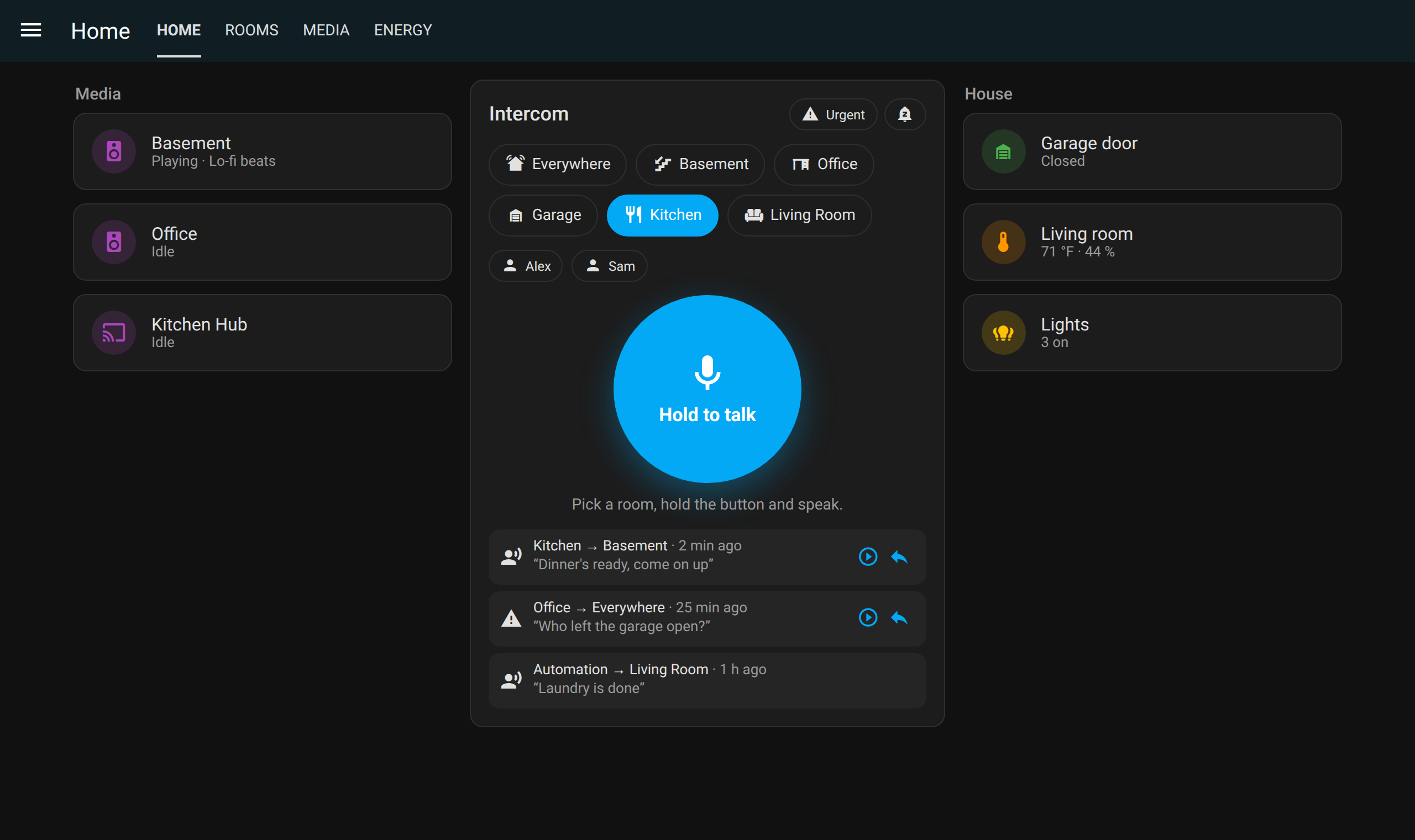
What it does
- Hold to talk on a dashboard card: your voice plays in one room, everywhere, or wherever a person is right now (with room presence such as Bermuda).
- Any speaker that can play an MP3 URL: Sonos, Google Cast / Nest, AirPlay and others, through their normal Home Assistant integrations.
- Replies: with phone notifications turned on, a Reply button aims the card back at the caller's room, and an Assist satellite in the room can answer out loud.
- Talk between dashboards: room stations make two-way browser calls between wall tablets, after the other side presses Answer.
- Answer the door: a doorbell press rings the rooms you pick and shows the camera on every card (details).
- Quiet when it should be: Do Not Disturb, quiet hours, and urgent calls that override them.
- Also from Siri, the Apple Home app, and
automations with
roomcall.broadcast.
Set it up in three steps
- Install RoomCall from the Marketplace, or HACS before Home Assistant 2026.11, and restart if asked (install options).
- Add the RoomCall integration and pick one media player per physical speaker (details). Each speaker's room is its area.
- Add the RoomCall card to a dashboard. Open it in the Home Assistant app or over HTTPS, pick a room and hold to talk (card options).
Is RoomCall the right tool?
If you only want to send the odd spoken message and already use Music Assistant, try its announcements first. Recent versions let you hold a button in its web interface and speak, and your message plays after you let go.
RoomCall is for using it as a household intercom:
- Your voice streams while you talk, on speakers that support it, instead of playing after you let go. Live streaming to Music Assistant players is unverified, so use recorded calls there if it misbehaves.
- Rooms follow your Home Assistant areas, and you can call a person wherever they are.
- People can answer, from their phone or an Assist satellite in the room.
- Quiet nights and urgent calls, with Do Not Disturb, quiet hours and an override.
- Beyond talking: reminders that wait until a chore is done, doorbell answering, Siri, Apple Home, and AI agent tools with per-account limits.
Limits
- Speakers play; they don't listen. Sonos, HomePod and Nest microphones are reserved for their own assistants. Two-way audio needs an Assist satellite (spoken replies) or a browser room station (a live call).
- The microphone needs HTTPS (Nabu Casa, a reverse proxy, Tailscale) or the Home Assistant mobile app.
- Speakers fetch audio from Home Assistant's internal URL, so it must be reachable from the speakers (troubleshooting).
- "Accepted" is not "heard". RoomCall reports that each speaker accepted the request. Confirm each room once with the card's Settings → Setup and sound tests.