Messages, questions and room stations
RoomCall provides a shared communication API for the dashboard, automations and AI
agents. Existing roomcall.broadcast automations continue to work.
Everyday use
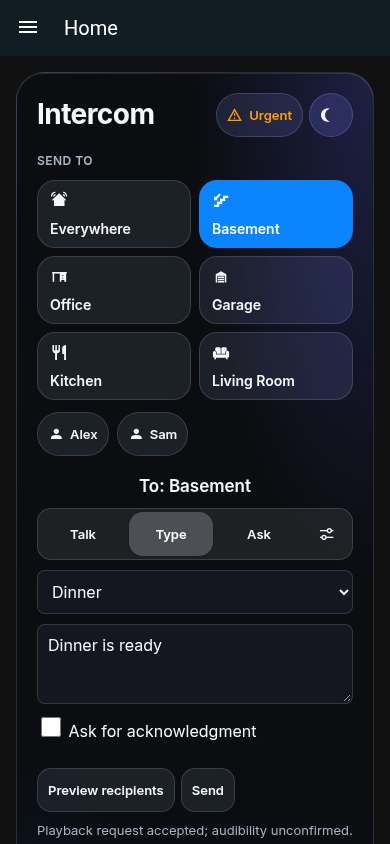
The dashboard card has Talk, Type and Ask tabs. Choose a room or person using the existing buttons. Type a message, preview its recipients, and send it. Ask selects a compatible Assist satellite and displays its transcribed answer. The Talk button also supports holding Space or Enter on a keyboard.
Open Settings → Setup and sound tests to test each selected speaker. After the sound plays, choose I heard it or I heard nothing. Only this explicit confirmation marks a test as heard. Results survive integration reloads and HA restarts.
What delivery means
RoomCall records independent evidence:
| Observation | What it establishes |
|---|---|
request_accepted |
The media-player action returned successfully. |
audio_fetched_ms |
Someone fetched the unique URL assigned to that endpoint. Available for RoomCall-hosted recordings, live audio and chime-enabled TTS. |
playback_reported_ms |
The player reported playing with the exact content ID of this call. |
human.acknowledged |
A signed-in household member explicitly acknowledged the message. |
None of the first three observations proves that a human heard the audio. Even a
reported playback state is device evidence, not acoustic measurement. Unsupported
observations remain absent; audible remains null. Chime-enabled TTS is prepared
once and hosted by RoomCall. Direct TTS with the chime off, and external audio
URLs, do not pass through its fetch endpoint.
RoomCall's Settings → Siri Shortcuts provides a room-specific Perform Action
setup guide and portable shortcut exports. See Siri setup and signing.
The tts_prepare timing in diagnostics measures speech synthesis plus chime
composition before speaker dispatch; device fetch/playback timings remain separate.
Actions and API
Use RoomCall: Communicate in the action editor. All operations return a JSON
object with ok and api_version. Validation and provider failures return an error
object with code, translated message, retryable, details, and next_actions.
The guided setup contract covers persisted setup, repair proposals,
announcement administration, and the shared human setup controls.
action: roomcall.communicate
data:
  operation: preview
  request:
    areas: [kitchen]
response_variable: preview
action: roomcall.communicate
data:
  operation: send
  request:
    people: [person.alex]
    message: We are leaving in five minutes
    idempotency_key: leaving-today
    expires_in: 300
    require_ack: true
    ack_timeout: 60
response_variable: message
Unlike the legacy broadcast action, new messages require an explicit target:
areas, floors, labels, speakers, people, or everywhere: true. Do not send
both message and media_url. A floor or label that matches no speaker fails; it
never falls back to every room. Agent restrictions apply to each speaker a floor or
label reaches, so a grant must cover all of them.
| Operation | Request |
|---|---|
catalog |
Empty. Machine-readable operation schemas, response envelope, flags and bootstrap recipe. |
setup |
Administrator: discover, plan, apply, verify, test, confirm, list, get and undo. |
announcements |
Administrator: schema, list, create, update, enable, disable and delete. |
doctor |
Administrator: inspect setup failures or propose a verified physical alternate route. |
discover |
Empty. Returns rooms, endpoints, people, satellites, stations, adapters and capabilities. |
diagnose |
Empty. Adds policy state and local metrics. |
policy |
Empty. Reports the caller’s RoomCall account restrictions. |
speech |
action: prepare plus message/targets and optional speech_profile; no playback. Administrator-only action: clear invalidates prepared audio. |
preview |
Targets, optional priority and volume. Does not synthesize or play audio. |
send |
Targets and message or media_url; optional options below. Returns a job ID. |
ask |
satellites, message, optional HA answers, expires_in, idempotency_key. |
status |
id. Returns job state, results, evidence and actual responses. |
cancel |
id. Cancels a queued job; active playback cannot be cancelled this way. |
acknowledge |
id, optional response. Requires a signed-in user and a waiting message. |
tasks |
action: list (default), complete or snooze; announcement id; optional minutes (snooze, default 30). Returns every announcement task. Complete only when a person says it was done. |
sound_test |
speaker. Plays a test sound and returns its job ID. |
confirm_test |
Test id, heard boolean. Records a human observation. |
adapter |
Configured adapter ID and action: call, answer, or hangup. |
voicemail |
action: list, delete, or replay; message id for delete/replay. |
The same contract is available through authenticated HTTP:
POST /api/roomcall/command
Authorization: Bearer YOUR_HOME_ASSISTANT_TOKEN
Content-Type: application/json

{"operation":"discover","request":{}}
Jobs and lifecycle
Jobs can be queued, running, completed, partial, failed, expired,
cancelled, waiting_ack, acknowledged, answered, or interrupted. Completed means the
playback requests finished, not that the audio finished or was heard. Check the
result's evidence and responses.
expires_in is 1–3600 seconds, default 300. ack_timeout defaults to 60 seconds.
require_ack enables explicit acknowledgment in call history and supported mobile
notifications. Notification actions must carry HA's authenticated user context;
otherwise acknowledge from the card or authenticated API.
fallback_notify: true sends an additional notification to the phones explicitly
configured in RoomCall when the acknowledgment deadline expires. It does not
automatically select a person's phone. This notification is a fallback alert;
the original acknowledgment window has already expired.
defer_until_present: true waits for fresh room presence for the supplied people,
within the job's expiry. Targets are checked again when presence becomes known.
Quiet hours and Do Not Disturb are checked again before queued playback starts.
RoomCall never promotes a blocked message to urgent automatically.
The runtime holds at most 128 jobs. Idempotency keys belong to the calling user
and retained job: reuse the same key and fields to retrieve the original job;
different fields return idempotency_conflict. Completed jobs are evicted oldest
first when the bound is reached. Ordinary jobs and keys are in memory; reload/restart
cancels their pending work. Explicit durable: true messages use the
durable lifecycle below; satellite questions remain in memory.
Playback to the same physical endpoint is serialized until its playback/restoration lease finishes. Unrelated rooms can proceed independently. Players without useful playback events use bounded duration estimates, as in the existing receiver restoration path. Keep external media URLs accessible for their whole queue and playback lifetime.
Questions
ask uses HA's assist_satellite.ask_question on available satellites advertising
conversation support. It returns the provider's sentence, matched answer id,
and slots. This is a transcribed reply, not a recording of the original voice.
The satellite's configured speech pipeline determines language and local/cloud
processing. An unanswered question expires; RoomCall does not invent an answer.
Browser room stations
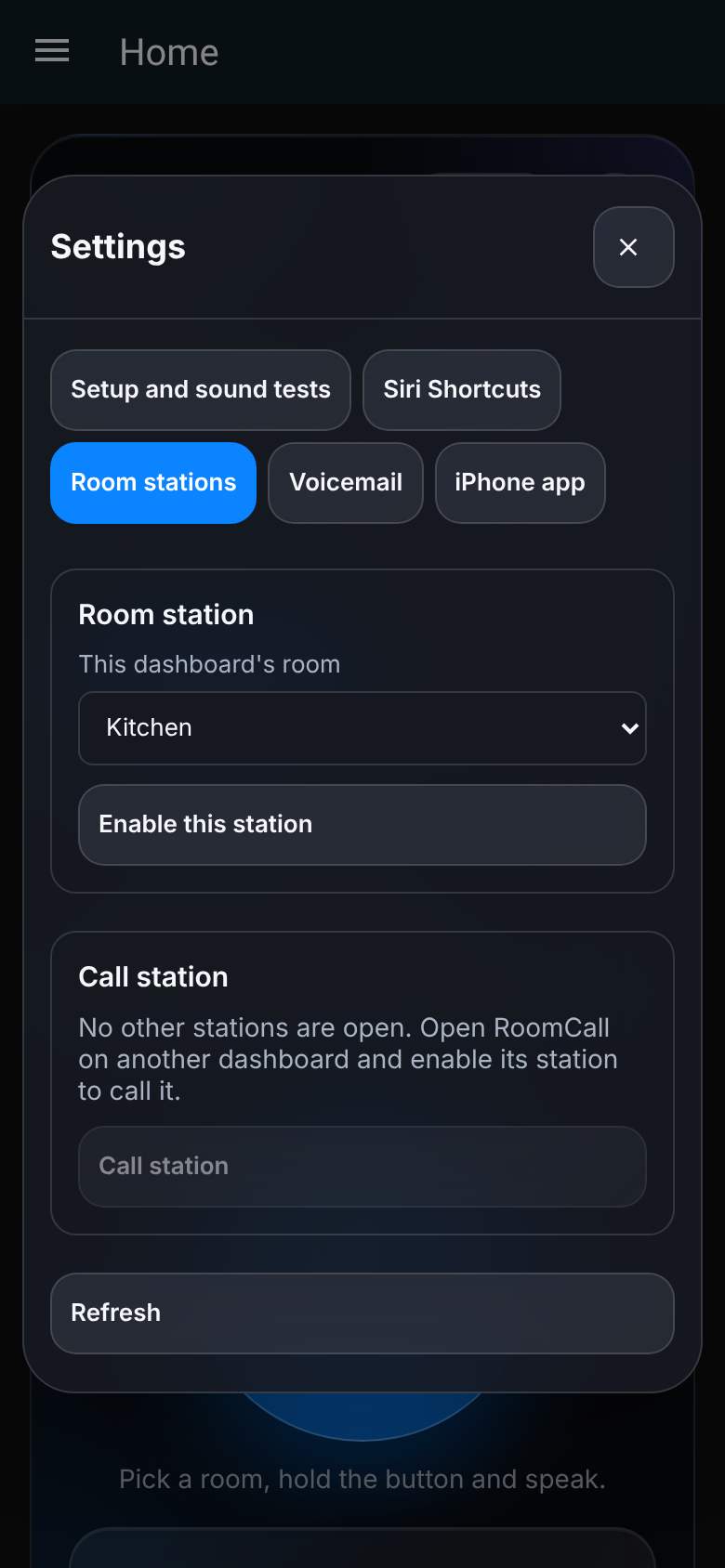
In Settings → Room stations, select the current room and enable the station. Enable a station on another open dashboard, refresh the station list, and call it. The recipient must press Answer before signaling audio. Microphone capture starts only after the local Call/Answer action. Hang-up or removing the card stops its microphone; disconnects and session deadlines clean up server state.
These conversations use WebRTC audio directly between browsers. They are not recorded. The default has no external STUN/TURN service: browser stations are intended for mutually reachable networks. HTTPS and browser microphone permissions are still required. A suspended/background browser cannot be treated as a reliably available phone. Speakers without an accessible microphone remain playback-only.
Answer the door
Under Configure → Communication, pick the Doorbell (a binary sensor such as a
Reolink or UniFi "visitor" sensor, an event entity, or a button), its Doorbell
camera, and the Rooms to ring (empty rings everywhere). When someone presses it:
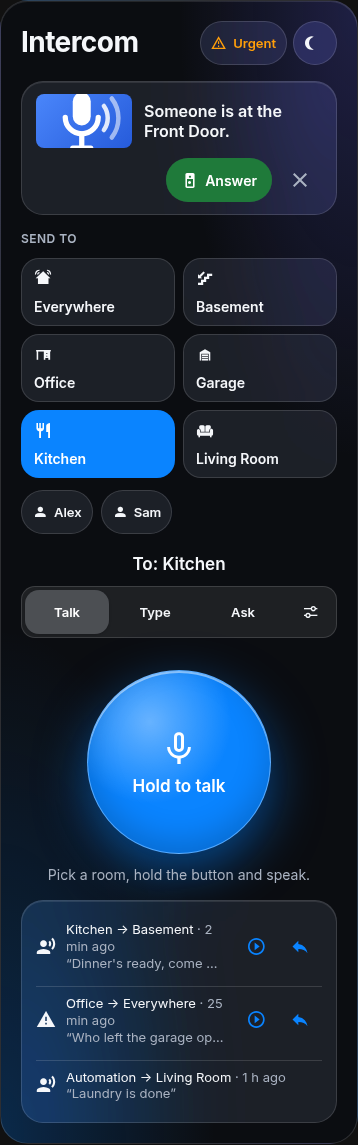
- the rooms hear "Someone is at the Front Door." with your chime;
- phones get a time-sensitive notification with the camera snapshot and an Answer button (on Apple Watch too). Answer opens the camera's live view in the Home Assistant app;
- every RoomCall card shows a banner with the snapshot and Answer, which opens the same live view on that dashboard or wall tablet.
The live view is Home Assistant's own camera dialog. Talking back to the visitor works there when the camera's stream supports two-way audio (for example through go2rtc). RoomCall does not relay doorbell audio itself. Presses within 10 seconds ring once, and a doorbell coming back online doesn't ring. Use this instead of the Announce the doorbell blueprint, not alongside it, or the rooms hear it twice.
Hands-free talk-back
Speakers like Sonos, HomePod and Nest keep their microphones for their own assistants. To answer a call out loud, put an Assist satellite in the room (an Atom Echo, an ESP32-S3 with an I2S microphone running ESPHome, or Home Assistant Voice) and assign it to the same area as the room's speakers. Then turn on Hands-free talk-back under Configure → Communication.
After someone talks to that room from another room's card, the satellite asks "Reply?" without a chime and listens. Whatever it hears is transcribed by the satellite's Assist pipeline and played in the caller's room as "Basement says: coming up in a minute". Nothing is sent when nobody answers.
- Works for room-to-room talk calls with a known caller room (
room:set on the card). Calls to Everywhere, typed messages and announcements don't listen. - A reply is sent as a message, so it never asks for a reply itself.
- Home Assistant provides the transcription, not the recording, so the reply plays in your configured text-to-speech voice. Speech processing follows the satellite's pipeline (local or cloud, as you configured it).
- The satellite must support Assist questions (
assist_satellite.ask_question).
Communication settings
Settings → Devices & services → RoomCall → Configure → Communication includes:
- Physical speaker aliases: an object mapping media-player IDs to a common physical ID. Automatic deduplication uses shared registry devices, MAC addresses or verified manufacturer/model/serial identities; it never merges speakers just because their model/room matches. Explicitly give separate aliases to independent zones on a shared receiver.
- Person preferences: objects with optional
roomandlanguage. A configured room is an explicit fallback when fresh measured room presence is unavailable. - Presence age/confidence: maximum age in seconds and minimum numeric confidence on room-location states (0–1). Missing confidence defaults to 1.
- Maximum announcement volume: caps the volume requested from the playback integration. Device-specific volume support still applies.
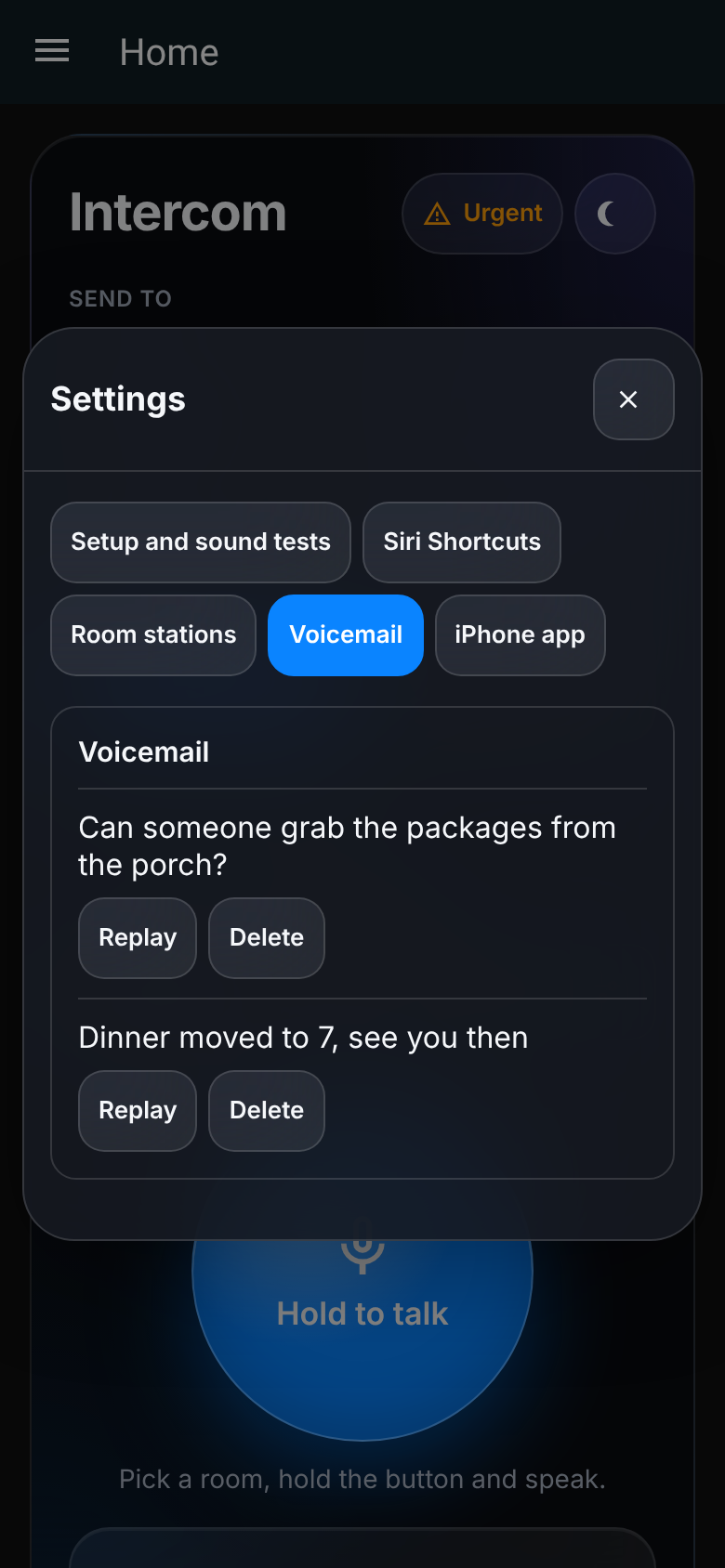
- Voicemail: listed, replayed and deleted in the card's Settings → Voicemail
(screenshot). Opt-in retention of unsuccessful recorded calls and message jobs
explicitly requesting
voicemail: true. Up to 20 items; audio is limited to 1 MiB per item. Stored locally in HA storage, subject to HA backup/storage access. Retention is configurable (300–604800 seconds), with automatic expiry. Turning it off deletes retained voicemail. List/delete/replay is scoped to its owner. - Translation provider: an explicitly selected
ai_taskentity. A message withtranslate: trueand a target language uses this provider; an invalid translation fails without sending the original. No cloud provider is selected automatically. - Doorbell, camera and rooms: ring rooms, phones and cards with an Answer button (details).
- Hands-free talk-back: an Assist satellite in a called room listens for a reply (details). Off by default.
- Prefer Music Assistant in these rooms: select MA instead of a native route only within a verified physical-speaker pair. Unknown MA identities still require manual selection or explicit aliases (setup and limits).
- Speech processing: optional recorded-audio high-pass filtering, noise reduction, normalization and peak limiting using ffmpeg. Live audio keeps its existing low-latency encoder. Browsers request echo cancellation/noise suppression for microphone capture where supported.
Example preference and alias objects:
preferences:
  person.alex:
    language: es
aliases:
  media_player.office_sonos: office_speaker
  media_player.office_music_assistant: office_speaker
A person's preferred language selects the TTS language; translation is separately opted in. Send separate requests for recipients with different preferred languages.
Playback device routes
The recipient preview shows the controller/input that will be interrupted. The delivery timeline reports restoration separately from acceptance.
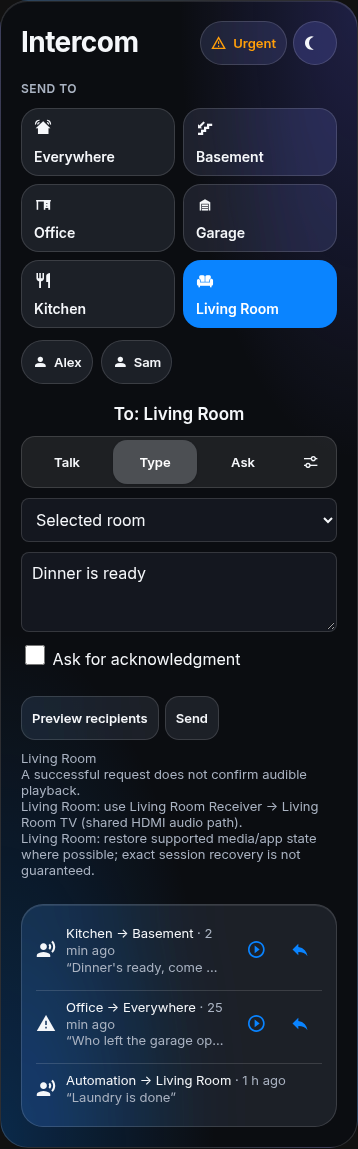
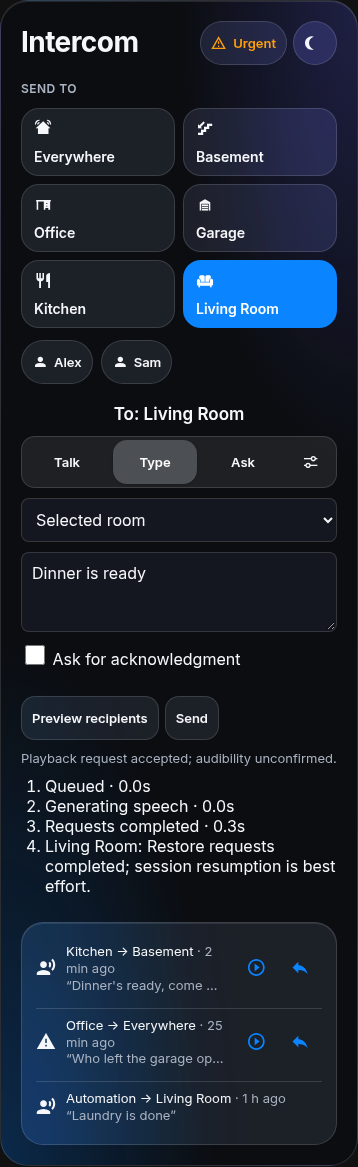
Receiver/TV interruption uses a playback endpoint plus its verified controls. For Android/Google TV, select the Cast media player for audio and add Android TV Remote for wake-up and app/transport control. For a HEOS receiver, add the native Denon AVR integration for main-zone power/input control. Device names or room membership alone do not prove those controls belong together.
RoomCall automatically pairs a unique HEOS/native receiver using shared registry identity, MAC, or manufacturer/model/serial evidence. It selects HEOS Music before dispatch instead of assuming a successfully fetched URL is audible. Disabled controls, secondary receiver zones and unrelated matching models are not automatically used. Placeholder serials are not identity evidence.
For a TV/box feeding an AVR over HDMI, configure Communication → Playback device routes with the exact controller and source from its HA state. Enter this object as the value of Playback device routes:
media_player.living_room_cast:
  controller: media_player.living_room_receiver
  source: HDMI 1
For an agent setup plan, nest this object under communication.playback_routes.
This is an integration option, not a configuration.yaml entry.
Agents discover the item schema in catalog.playback_routes, and apply it through
the shared setup plan/options flow. The endpoint's interruption metadata reports
the controller, source options, affected entity IDs and recovery capabilities.
Previews report the same plan without switching inputs or playing audio.
Controller permissions, scoped-account restrictions and assistant exposure apply in addition to the playback endpoint's permissions. All affected entities must be permitted/exposed. Discovery hides inaccessible companion details. Sources are selected by exact name; ambiguous or unconfirmed preparation fails without dispatching the announcement. Partially applied preparation is rolled back where possible; loss of connectivity or permissions can prevent restoration.
Routes sharing an output are deduplicated and serialized through playback and restoration. Before an override, RoomCall captures supported input, volume, mute, power, app and media state. Standby-hidden values are captured after wake and before changing them. Restoration remains best effort: plain replayable Cast URLs can resume from their last reported position when supported, while Android apps can be reopened and sent supported play/pause requests. DRM/expired streams and provider-owned sessions may not recover the exact program or timestamp. Recognizable RoomCall/TTS URLs are not replayed as background media, and the Cast receiver app itself is not resumed as a substitute for a missing original session.
The ordinary job result still means request acceptance. Independent
evidence[endpoint].interruption.restore reports pending, requests_completed,
failed, disabled or skipped_external_change_or_permission; none proves sound
or exact session recovery. Changes to a Cast session, receiver input/power, or
permissions stop restoration from overwriting the newer state. The card shows
these observations separately, and owned-job subscribers receive updates.
Durable jobs save late restoration observations without changing replay rules.
SIP and doorbell adapters
Configure named adapters pointing at existing Home Assistant scripts:
adapters:
  front_door:
    kind: doorbell
    script: script.front_door_intercom
  home_phone:
    kind: sip
    script: script.home_phone_intercom
RoomCall invokes script.turn_on with variables roomcall_action (call, answer,
hangup) and roomcall_adapter (the configured name). Implement those branches
using the actions actually supported by your installed SIP/doorbell integration.
Only configured script entities may be invoked and HA permissions/exposure apply.
These adapters bridge control to existing integrations. They do not add a SIP server, invent a manufacturer's two-way audio API, or bridge a camera's audio transport into a browser station. Advertised availability concerns the configured script, not physical-device reachability or proven audible audio.
Metrics and validation
diagnose and the redacted integration diagnostics include bounded local counters
and p50/p95 latency samples (up to 256 per metric): request acceptance by route,
hosted-audio fetches, matching playback reports, setup confirmation, expired/failed
jobs, acknowledgments, retries, and duplicate requests/routes suppressed.
An accepted sound test explicitly reported silent increments accepted_but_silent.
These metrics never include message text. First audible audio and whether an
unacknowledged message was heard remain unknown without acoustic/human evidence.
HA tests exercise actual tool discovery, preview/send/status/recovery, queue
contention, ownership, fetch evidence, persistence, real ffmpeg processing and
WebSocket station signaling. scripts/qa_communication.py exercises desktop/mobile
controls, all three card layouts at 240–600px widths, auto/fixed-height dashboard
cells, and real browser WebRTC with test microphones. CI requires 100% statement
coverage for both Python packages on every supported Python/HA test job, without
source omissions. This does not measure JavaScript statement coverage. Physical speaker and
doorbell behavior must still be checked on the chosen hardware.
Agent account permissions and job subscriptions
Use a dedicated non-administrator HA account with appropriate HA entity permissions. Under Communication → Agent account policies, map its HA user ID to restrictions:
agent_policies:
  HA_USER_ID:
    areas: [kitchen, basement]
    entities: []
    operations: [discover, preview, send, status, policy]
    start: "08:00"
    end: "21:00"
    urgent: false
    max_volume: 0.4
    per_minute: 10
These are additional RoomCall limits, not HA-wide token scopes: the account's other
HA services remain governed by HA. Accounts without a policy retain existing behavior.
entities grants exact IDs; areas grants RoomCall entities assigned to those areas.
Policies are checked on discovery/preview and again before playback, including queued
work. Requested volume is capped, unsupported device volume behavior is unchanged.
Hours use HA's local timezone and may cross midnight; equal start/end means all day.
The rate window is per account per runtime and resets on integration reload/restart.
Retries using an existing job key do not dispatch again or consume another playback.
policy reports the caller's own limits for agent discovery. catalog remains
available to explain operations; previews do not play audio or consume message rate.
RoomCall setup and administration operations are unavailable to scoped accounts.
Do not give an agent an administrator account that can remove its own restrictions.
Authenticated clients can subscribe via WebSocket {id: 1, type: "roomcall/job_events",
job_id: "JOB_ID"}. The result contains the initial status; subsequent events contain
status updates. Ownership and current permissions are checked on every update.
Use HA's unsubscribe_events to remove the subscription. No global message feed or
unauthenticated callback is exposed.
Delivery timeline
Every message job exposes a bounded progress list with stage codes and monotonic
elapsed milliseconds. The card renders queueing, presence wait, speech generation,
chime composition, speaker wait, dispatch and terminal outcome. Stage timestamps mark
observed transitions; the gap to the next stage is elapsed work/wait, not an acoustic
measurement. Direct TTS routes may not expose provider preparation separately.
Endpoint audio-fetch and matching playback reports are shown separately. Their clocks start when RoomCall prepares the endpoint URL/watcher, before its playback request; they can include queue waits, stagger and route preparation. They do not isolate speaker buffering and must not be added to whole-job elapsed times. The current card labels these observations "after dispatch"; interpret those labels using the broader clock boundaries above, not as isolated device startup. A completed request is not a claim that playback finished or somebody heard it. Explicit human acknowledgment remains separate. Existing structured errors provide recovery instructions for blocked/failed messages. The UI uses the shared translated labels and preserves narrow layouts and screen-reader status announcements.
Household profiles
Configure Communication → Household profiles with at most 32 named presets:
household_profiles:
  dinner:
    name: Dinner
    defaults:
      areas: [kitchen, basement]
      message: Dinner is ready
      volume: 0.4
    speech:
      engine: tts.piper
      voice: en_US-lessac-medium
      chime: ding
The Type tab offers a profile picker and fills its reusable message. Preview recipients
before sending. Agents discover permitted profiles in discover.profiles, then use
preview or send with profile: dinner; a message override is optional. Supplying
an explicit destination replaces every profile destination rather than adding to it.
Volume, language, expiry and acknowledgment defaults use the ordinary send contract.
Profiles require explicit destinations, cannot reference another profile, and do not
bypass HA permissions, DND, quiet hours or entity exposure. Voice/chime choices apply
to that message only, leaving the global engine and chime unchanged.
Durable message jobs
Send durable: true with an explicit idempotency_key to persist a message through
Home Assistant reloads/restarts. Ordinary messages remain memory-only. Durable text,
targets, results and responses are stored locally using HA storage and may be in HA
backups. This is an explicit retention choice; no recorded audio is journaled.
Queued, unexpired messages resume with current HA permissions, exposure, presence,
DND and quiet-hours checks. A job that had entered dispatch or was awaiting an
acknowledgment becomes interrupted after a crash and is never replayed automatically.
job_interrupted means playback might have happened: inspect the destination before
sending a new message. This provides conservative duplicate avoidance, not exactly-once
or proof of audibility. Expiry uses the original wall-clock deadline.
Completed/expired/interrupted job results retain their original owner and idempotency identity across restart, bounded to 128 retained jobs and up to 24 hours. Old terminal jobs may be evicted when that bound is reached; keys are valid only while retained. Repeating an unchanged key returns the original job; changing its fields conflicts. Satellite questions do not opt into durable replay.
Prepared speech and voice profiles
Configure Communication → Speech profiles with fast, balanced and/or quality
objects, each containing an engine (such as tts.piper) and explicit voice
(such as en_US-lessac-medium). These are labels you assign, not speed guarantees.
Send speech_profile: fast with a message to select that voice without changing
Piper's global default. An explicit speech profile overrides a household profile's
engine and voice; the household chime still applies. The same option is available to agents through send.
Use operation speech to pre-generate without playing:
action: roomcall.communicate
data:
  operation: speech
  request:
    action: prepare
    areas: [basement]
    message: Dinner
    speech_profile: fast
response_variable: preparation
Send the same content, destination and speech profile afterward using operation: send. Targets and caller permissions
are checked first. Reusing the same message, language, voice and chime avoids both
speech generation and audio composition; translated text is part of that identity.
The cache is memory-only, owner-scoped, limited to ten minutes and 32 entries / 16 MiB.
Configuration reloads clear it; changes to the explicit engine, voice or chime
use another key. After changing a provider's default voice or replacing a custom
chime file in place, an administrator must call speech with {action: clear} or reload
RoomCall. Cached audio is never proof of playback or audibility.